
How To Use Bybit Easily As A Nigerian – Every Detail
How To Use Bybit Easily As A Nigerian – Every Detail.
In This Content
How to Register on Bybit and Use P2P: A Beginner-Friendly Guide
If you’re new to the world of crypto or simply looking for a safe and fast way to buy or sell digital currencies, Bybit might just be the perfect place to start. Known for its user-friendly interface, low fees, and secure platform, Bybit has become one of the top choices for crypto traders around the world, especially in Africa and Asia.
In this article, we’ll walk you through:
-
How to register on Bybit in just a few minutes
-
The top benefits of using the platform
-
How to easily use the P2P (Peer-to-Peer) feature to buy and sell crypto using local currency
Let’s get started.
How to Register on Bybit (Step-by-Step)
Getting started with Bybit is simple, whether you’re on a phone or a laptop.
1. Go to www.bybit.com
Or download the Bybit mobile app from the Play Store or App Store and make sure you use this promo code ZA5798Y to not miss out on new user benefits.
2. Click “Sign Up” or “Register”
You can register with either:
-
Email
-
Phone number
3. Create a strong password and agree to the terms
Make sure your password is secure and unique.
4. Verify your email or phone
You’ll receive a code via email or SMS. Enter it to confirm your identity.
5. Set up 2FA (Two-Factor Authentication)
This step is optional, but it’s highly recommended to keep your account safe.
Boom! You’re in.
Top Benefits of Using Bybit
So, why are so many people switching to Bybit? Here are just a few reasons:
Easy to Use
The platform is clean and beginner-friendly, even if you’re completely new to crypto.
Low Fees
Bybit offers competitive fees for spot trading, futures, and P2P transactions.
Top-Notch Security
With features like cold storage, KYC, and 2FA, your funds are kept safe.
Supports Local Currencies
You can buy and sell crypto in your local currency — Naira, Cedis, Kenya Shillings, and more.
24/7 Support
Got questions? Live chat is available any time, any day.
Earn Rewards
Bybit gives you a chance to earn bonuses by completing simple tasks or referring friends.
How to Use Bybit’s P2P (Peer-to-Peer) Feature
One of the best parts about Bybit is its P2P marketplace, where you can buy or sell crypto directly from other users, often using bank transfer or mobile money.
Here’s how it works:
Step 1: Log in and Go to “Buy Crypto”. Or as soon as you login, you might see the P2P logo already on your dashboard.
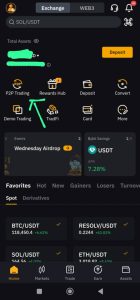
Once you’re signed in, click on “Buy Crypto” then “P2P Trading.”
Step 2: Choose to Buy or Sell
Want to buy USDT, BTC, or ETH? Select “Buy.”
Want to convert crypto back to cash? Click “Sell.”
Step 3: Pick Your Currency & Payment Method
For example:
-
NGN (Naira)
-
GHS (Cedis)
-
KES (Shillings)
And payment methods like bank transfer or mobile money.
Step 4: Select a Verified Trader
Always choose someone with good ratings and a high order completion rate.
Step 5: Enter the Amount and Start the Trade
Type in how much you want to buy or sell, then follow the payment instructions.
Step 6: Complete the Payment (if buying)
Send the money directly to the seller’s account (as shown), then click “Payment Completed.”
Step 7: Wait for Crypto Release
Once the seller confirms your payment, your crypto will be released to your Bybit Funding Wallet.
Step 8: Transfer to Your Spot Wallet (Optional)
You can leave it in your Funding Wallet or move it to your Spot Wallet to trade or withdraw.
Pro Tips for Safe P2P Trading
-
Always trade with verified users
-
Don’t send payment outside the platform
-
Take screenshots of payments and confirmations
-
Use Bybit’s chat feature only — avoid WhatsApp, Telegram, etc.
How to Withdraw From Bybit to Your Local Bank Account Using P2P As a Nigerian
If you’ve earned profits on Bybit or simply want to cash out some crypto into your local currency, the easiest and safest method is through Bybit’s P2P (Peer-to-Peer) marketplace.
This guide will show you — step by step — how to withdraw crypto from Bybit to your bank account, even if you’re a total beginner.
What You’ll Need Before You Start
Before withdrawing, make sure you have:
-
A verified Bybit account
-
Crypto in your Funding Wallet (like USDT, BTC, or ETH)
-
A linked local bank account or mobile money account
-
A stable internet connection
Note: You can only sell crypto via P2P if it’s in your Funding Wallet — not Spot Wallet.
Step 1: Transfer Crypto to Your Funding Wallet
-
Go to your Bybit dashboard
-
Click on “Assets” → “Spot” or “Derivatives”
-
Select “Transfer”
-
Choose to transfer from Spot/Derivatives Wallet → Funding Wallet
-
Select the crypto (e.g., USDT) and amount
-
Click Confirm
Step 2: Go to P2P and Select “Sell”
-
Click “Buy Crypto” on the top menu
-
Choose “P2P Trading”
-
Click the “Sell” tab
-
Select the crypto you want to sell (e.g., USDT)
-
Choose your preferred currency (e.g., NGN, GHS, KES) and payment method (e.g., Bank Transfer)
Step 3: Choose a Reliable Buyer
Look for buyers with:
High completion rate (90% and above)
Verified status
Fast release time
-
Click “Sell” next to the trader you prefer
Step 4: Enter the Amount and Confirm
-
Enter how much crypto you want to sell
-
Confirm your payment method (make sure your bank or mobile money details are correct)
-
Click “Sell USDT” (or BTC/ETH, depending on what you’re selling)
Bybit will now lock your crypto in escrow.
Step 5: Wait for Buyer’s Payment
-
The buyer will send money to your bank or mobile account
-
Do NOT release crypto until you confirm you’ve received the money
-
You can chat with the buyer within the platform if needed
Step 6: Confirm Payment and Release Crypto
Once the money lands in your account:
-
Double-check the amount
-
Click “Payment Received.”
-
Enter your Google Authenticator or SMS code
-
Click “Confirm”
Your crypto will be released to the buyer.
Done! You’ve Successfully Withdrawn Your Crypto
The money is now in your local bank account, and the crypto has been safely transferred to the buyer through Bybit’s escrow system.
Safety Tips for P2P Withdrawal
-
Never release crypto before confirming money has hit your account
-
Avoid trading outside Bybit (WhatsApp, Telegram, etc.)
-
Always take screenshots of transactions for your records
-
Only use verified payment methods linked to your real name
Bybit’s P2P platform makes withdrawing crypto into your local currency safe, fast, and beginner-friendly. Whether you’re in Nigeria, Ghana, Kenya, or elsewhere, the process works smoothly, without the need for a third-party exchanger.
Just follow these steps, stay alert, and enjoy seamless access to your funds!